

We deployed a document processing system at a car parts company earlier this year. The director who'd be using it didn't want it. He'd been handling foreign supplier invoices himself for years — PDFs arriving by email, retyped line by line into the ERP. Different layouts, different languages, different tax line labels. He told us, more or less, that this was never going to work.
A few weeks later, the system had about thirty minutes of downtime one evening. He emailed us immediately: "Please, come on. Can you fix this? I'm not going to retype this by hand anymore in my life."
This is a director. Someone who should be spending his time on decisions, not squinting at "Rechnungsnummer" and tabbing between a PDF and an ERP input field. The €12 per invoice is the line item. The real expense is a director doing data entry instead of running his business.
The average cost to process a single invoice manually is €12–15. An experienced accounts payable clerk handles about five per hour. But in companies this size, it's often not an AP clerk doing the work. Multiply by volume and the number gets uncomfortable. A 30-person company processing 200 invoices a month is spending roughly €2,500 just on data entry. Before anyone catches the typos.
What traditional OCR actually did (and why it wasn't enough)
Optical character recognition has existed for decades. It reads characters pixel by pixel, left to right, top to bottom. Like reading a book. That works for a paragraph of text. It breaks on invoices because invoices aren't books. They're layouts.
Old-school OCR needed templates: rigid rules like "the total is always in the bottom-right corner, the vendor name is in the top-left." Change the layout, and it broke. A German invoice looks nothing like a Spanish one. Handwriting was nearly hopeless. Accuracy hovered around 80%, which sounds workable until you realize one in five fields is wrong. Every document still needed a human to verify.
The bottleneck was never scanning. It was understanding. OCR could see letters but couldn't read a document.
What changed: vision models that read like people do
A new class of AI model processes documents differently. Vision-Language Models (VLMs) see the whole page as an image first, the way you would. They read the table grid, the header block, the logo position, the line items, the totals, and then extract text within that visual structure.
When traditional OCR pulls "10/24" from a shipping label, it has no idea if that's a date, a part number, or a quantity ratio. A VLM sees "DTE: 10/24" in context, recognizes the field label, understands the surrounding layout, and reads it as a delivery date.
Tables are where the difference is clearest. OCR loses the relationship between columns and rows unless someone pre-marks them. VLMs maintain the structure. They understand that a number next to "Gesamt" at the bottom of a table is the total, regardless of where it sits on the page or what language it's in.
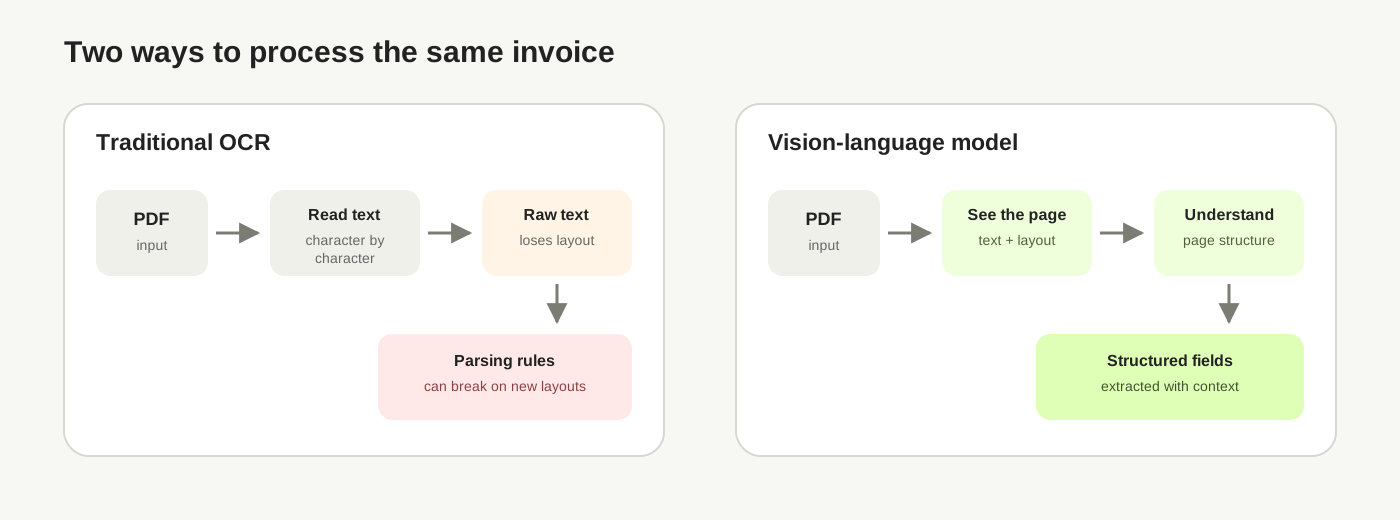
Accuracy on varied formats (PDFs, scans, phone photos, handwriting) now exceeds 99%. No templates needed. You describe what to extract in plain language: "pull the vendor name, invoice number, line items, and total." The model figures out where those things are.
One invoice, start to finish
Here's what the process actually looks like with a foreign inbound invoice — the kind that used to take our car parts director twelve minutes of manual retyping.
The document: A PDF invoice from a German industrial supplier. Header reads "Rechnung Nr. 2847." Vendor name, address, and USt-IdNr. (their VAT number) in the top block. A table with five line items: descriptions in German, quantities, unit prices, net amounts. Below the table: Nettobetrag €3,456.00, Umsatzsteuer 19% at €656.64, Gesamtbetrag €4,112.64. A handwritten note in the margin: "freigegeben — K.M."
What happens:
- The PDF hits the processing pipeline. The vision model reads the full page as a visual document with structure, not character by character.
- It identifies this as a German VAT invoice. It locates the header, vendor block, line-item table, tax calculation, and that handwritten annotation.
- Extraction: Vendor: Müller Industrietechnik GmbH. VAT ID: DE123456789. Invoice #: 2847. Date: 14.01.2026. Five line items with descriptions, quantities, unit prices. Net: €3,456.00. VAT 19%: €656.64. Total: €4,112.64. Note: "freigegeben — K.M." (approved).
- Structured output: clean JSON or UBL XML, mapped to your ERP's field schema. Vendor matched against your master data. Tax treatment flagged as EU reverse charge. Ready to post.
- Time elapsed: under two seconds.
Compare that to the manual version. Open the email. Download the attachment. Open the PDF. Start reading German. Find the vendor name (is this one in our system already?). Type the invoice number. Tab to the next field. Read each line item, mentally translating. Check the tax calculation. Copy everything to a spreadsheet or type it directly into the ERP. Flag the handwritten note for someone who reads German. Send the whole thing to accounting for a second review. Twelve minutes on a good day. And if someone miskeys the VAT number, you find out when the tax reconciliation fails months later.
Governments are digitizing invoices. What about everything else?
E-invoicing mandates are rolling out across the EU, India, Brazil, Saudi Arabia. The direction is clear: structured digital invoices are becoming the norm for domestic transactions.
But two things get lost in this narrative.
First, someone still fills in the forms. The format is digital, but the data entry often isn't. A mandate that says "send invoices as XML" doesn't eliminate the work of getting your data into that XML. It moves the data entry from the recipient to the sender, or to their software. Cross-border invoices, like the German PDF in our example, aren't covered by any single country's mandate. They arrive however the supplier sends them.
Second, invoices are the easy case. Governments mandated structure because tax collection depends on it. Nobody mandated structure for supplier contracts, shipping documents, certificates of compliance, customs declarations, or the years of customer correspondence sitting in email archives. Those stayed unstructured because there was no regulation forcing it and the cost of digitizing them manually was impossible to justify. (By most estimates, 80–90% of business data is unstructured.)
A business with 15 years of supplier contracts in filing cabinets was never going to pay someone to key them all in. That math didn't work.
It works now. What used to cost hours per document costs fractions of a cent. And the payoff goes beyond "digital files." It's searchable, connected business context. Which supplier gives you the best terms? Which contracts auto-renew next quarter? Which customer complaints reference the same product defect? The answers were always in the documents. They were just too expensive to extract.
The honest caveats
AI extracts what's there. It doesn't fix what's wrong. A miscalculated total on the original invoice stays wrong in the output. And 39% of invoices contain errors at source. Validation rules catch some of this. Not all.
Handwriting accuracy depends on legibility. The >99% number is on well-formed documents. A truly illegible scrawl still needs a person.
The extraction is fast. Connecting it to your ERP, your accounting workflow, your approval chain: that's where the implementation work goes. The AI reads the document in two seconds. Getting your systems to accept and act on that output takes longer to set up.
And review doesn't disappear. It shrinks. The goal is moving from processing every document to reviewing exceptions. You still need someone checking the edge cases. Best-in-class AP teams reach about 49% touchless processing. Half the invoices flow through without anyone touching them. The other half still get human review. That's not full automation. It's a different job description: from data entry to exception handling.
From processing to understanding
Best-in-class AP teams process invoices at €2.78 each. The average is €12.88. That's a 78% cost difference, and most of it comes from eliminating the manual re-keying step.
But cost wasn't what converted our car parts director. He didn't email us in a panic because of the savings on invoice processing. He emailed because he'd tasted what his workday felt like without the mindless retyping, and thirty minutes of downtime was enough to remind him what going back meant.
That's the part the ROI calculations miss. When documents become structured data instead of files in a folder, the person who used to retype them gets their job back. The one they were hired for.
Queli builds intelligence infrastructure that turns unstructured documents into searchable institutional knowledge.